
Overview
PlateBendingDraw is a productivity tool for AutoCAD designed to simplify the creation of cross-sectional drawings of bent metal plates.
It is useful for architectural metalwork, sheet metal components, and fabrication drawings.
Drawing Settings
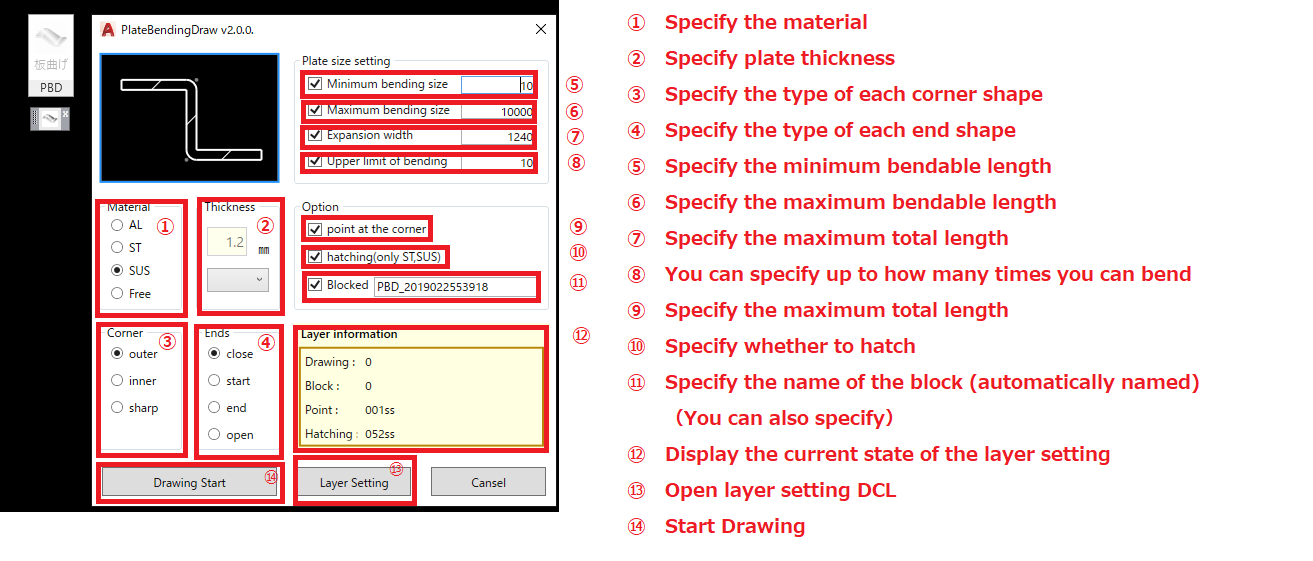
The settings dialog allows you to specify the material, plate thickness, corner shapes, and end shapes before starting a drawing.
You can also configure minimum and maximum bendable lengths, maximum total length, and the maximum number of bends.
Hatching and Blocks
The application provides options for hatching and block naming, including automatic block naming.
Layer Settings
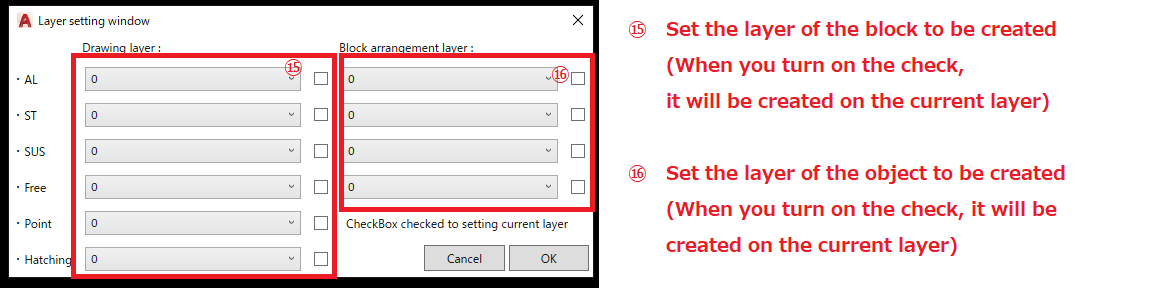
Configure drawing object layers and block arrangement layers in the layer settings dialog. The current layer can also be selected using the corresponding checkbox.
Getting Started
- Open AutoCAD.
- Launch PlateBendingDraw from the ribbon or enter
PBDat the command line. - Configure the plate and drawing settings.
- Click Drawing Start to begin drawing.
Typical Applications
- Architectural metal panels
- Metal copings and flashings
- Bent metal brackets
- Metal frames and trims
- Sheet metal components
- Fabrication and shop drawings
Installation
Download PlateBendingDraw from the Autodesk App Store and follow the installation instructions.